

If you use Claude for writing, research, reports, planning, or team projects, Claude Docs can make your workflow much easier.
Instead of creating a document separately and then moving AI-generated content into it, Claude can create and edit a document directly inside your Claude workspace.Claude Docs is designed for creating living documents that you can write, edit, review, share, and export with Claude.
You can ask Claude to create a document from a conversation, make changes to it, add comments, or use information from files and connected apps.
In this guide, we'll explain what Claude Docs is, how Claude Docs works, its main features, availability, supported export formats, limitations, and how to use Claude Docs step by step.
What Is Claude Docs?
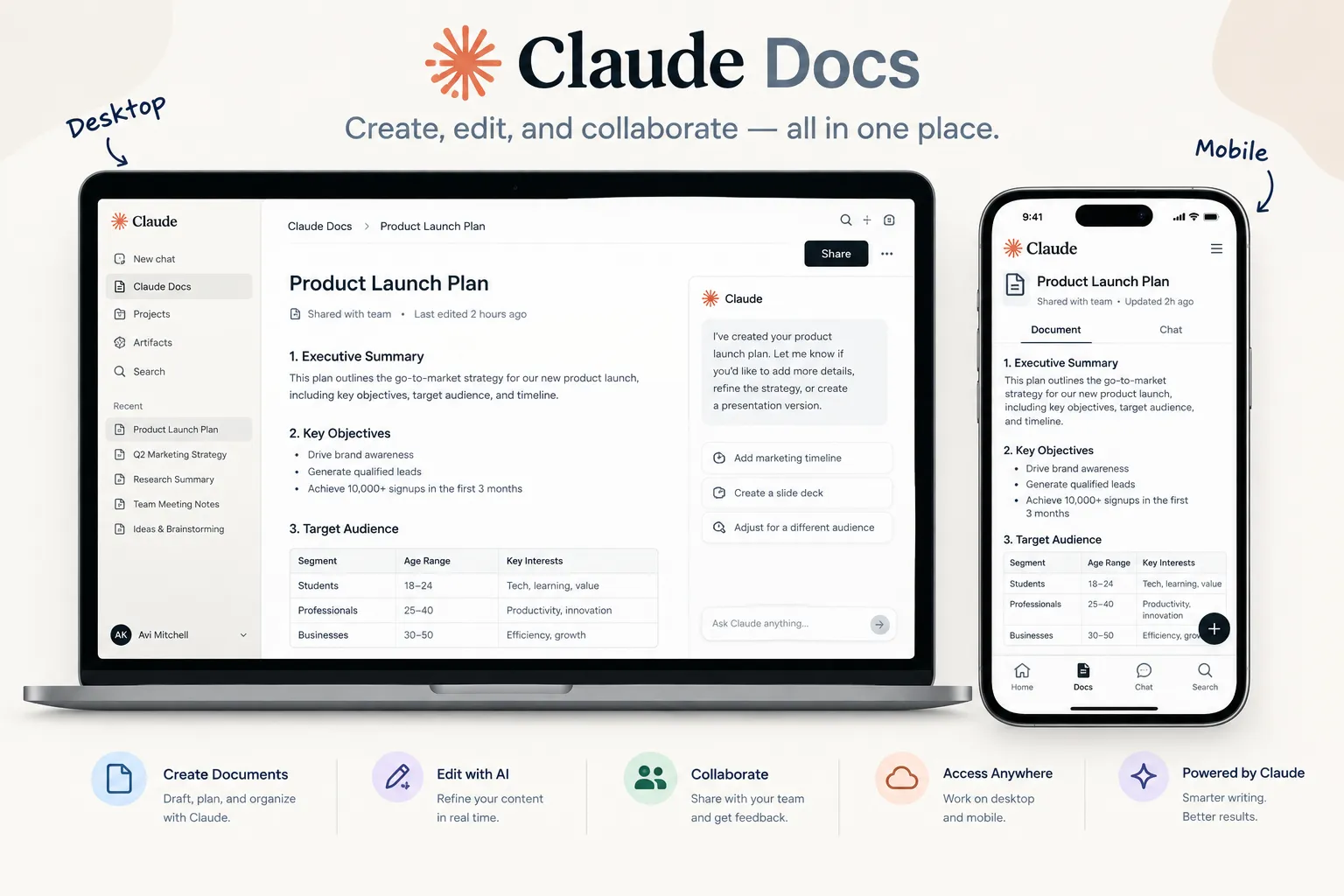
Claude Docs is a document creation and editing feature inside Claude. It allows users to create rich-text documents with Claude and continue working on those documents without moving the content to another application.
A Claude Doc can contain headings, tables, formatting, and multiple tabs for organizing different sections.
Claude can use the context from your conversation, uploaded files, projects, memory, skills, and connected apps when creating a document.
This means you can start with information you have already provided instead of beginning with a blank page.
Claude Docs is currently available in beta.
Is Claude Docs Free?
No. According to Anthropic's current documentation, Claude Docs is available on:
1. Claude Pro
2. Claude Max
3. Claude Team
4. Claude Enterprise
It is not currently available on the Free plan.
Claude Docs Features

Claude Docs combines AI writing with a document workspace. Here are some of its main features.
1. Create Documents With AI
You can ask Claude to create a document directly from a conversation.
For example, you could ask:
"Create a two-page project proposal based on the information we discussed
"Claude can ask clarifying questions before creating the document and then generate the draft inside the document workspace.
You can also start a document using /docs or select Output → Docs from the message box.
2. Edit Documents With Claude
You don't have to accept the first version Claude creates.
You can edit the document yourself or ask Claude to make changes.
For example:
1. Make the introduction shorter.
2. Add a conclusion.
3. Rewrite this section in simpler English.
4. Add a table comparing these options.
5. Make this report more professional.
Claude can then revise the document based on your instructions.
3. Edit the Document Yourself
Claude Docs also works like a normal editable document.
You can click inside the document and make changes manually. Your edits are saved automatically and appear to other people who have the document open.
This gives you more control instead of relying completely on AI-generated content.
4. Comments and Collaboration
Claude Docs supports comments for collaborative editing.
You can select text and leave a comment for other collaborators. You can also mention @Claude in a comment to ask Claude to make a specific change.
Claude can also leave comments while drafting to explain its choices or ask for additional information.
5. Create Charts and Visuals
Claude can create charts, diagrams, graphs, and timelines inside a document.
For example, you could ask Claude to turn data from a connected source into a chart instead of manually creating a screenshot and inserting it.
One limitation is that charts and diagrams do not automatically update when the connected data changes. You need to ask Claude to refresh them.
6. Use Files and Connected Information
Claude Docs can use information already available to Claude.
Depending on your setup, Claude can work with:
1. Uploaded files
2. Project information
3. Memory
4. Skills
5. Connected apps
This can be useful when creating reports, summaries, briefs, project documents, or other work based on existing information
7. Share Documents
Claude Docs allows you to share documents with other people.
Sharing options depend on your Claude plan.
On Pro and Max, documents can be shared with anyone who has the link. On Team and Enterprise, documents can be shared with people or groups within the organization, but external sharing is not currently supported
8. Export Claude Docs
One of the useful features is the ability to export a document into different formats.
Claude Docs currently supports exporting to:
1. Microsoft Word (.docx)
2. PDF (.pdf)
3. Markdown (.md)
4. Google Docs
This makes it easier to continue working on your document outside Claude.
How Does Claude Docs Work?

Claude Docs is built around a simple workflow:
Prompt → Claude creates document → Review → Edit → Collaborate → Export
Here's how the process works.
Step 1: Give Claude a Request
Start a conversation with Claude and describe the document you want.
For example:
"Create a one-page marketing plan for a new AI productivity app."
You can provide additional information such as the target audience, length, tone, and important points.
Step 2: Claude Creates the Document
Claude uses the information available in the conversation and creates a document.It may ask clarifying questions before creating the final draft.
Step 3: Review the Draft
Read through the generated document and check the information.
You can manually edit the document or ask Claude to change specific sections.
Step 4: Ask Claude for Improvements
You can continue working with Claude.
For example:
"Add a table comparing the three plans."
or
"Rewrite the introduction for beginners."
Claude can make the requested changes directly in the document.
Step 5: Share or Export
Once the document is ready, you can share it with collaborators or export it as Word, PDF, Markdown, or Google Docs.
How to Use Claude Docs

Here is a simple step-by-step method for beginners.
Method 1: Create a Doc From a Claude Conversation
1. Open Claude.
2. Start a new conversation.
3. Describe the document you want.
4. Use /docs or select Output → Docs.
5. Answer Claude's questions if it needs more information.
6. Review the generated document.
7. Edit it manually or ask Claude for changes.
8. Share or export the finished document.
Method 2: Start From the Artifacts Tab
You can also create a document from the Artifacts tab.
1. Open the Artifacts tab.
2. Select a Docs template.
3. Describe what you want to create.
4. Let Claude generate the document.
5. Review and edit it.
6. Share or export it when finished.
What Can You Create With Claude Docs?
Claude Docs can be useful for different types of work.
For Students
Students can use Claude Docs to create:
1. Study notes
2. Research summaries
3. Project outlines
4. Revision guides
5. Essay drafts
6. Presentation content
However, AI-generated academic workshould always be reviewed and adapted to meet your school's or university's rules.
For Professionals
Professionals can use Claude Docs for:
1. Business reports
2. Meeting summaries
3. Project plans
4. Proposals
5. SOPsTraining documents
6. Internal documentation
Claude Docs can also be useful for improving everyday productivity with AI tools.
For Content Creators
Bloggers and content creators can use Claude Docs to organize:
1. Article drafts
2. Content briefs
3. Research notes
4. Social media plans
5. Video scripts
6. Content calendars
Claude Docs vs Traditional Document Editors
Claude Docs is different from a traditional document editor because the AI is integrated directly into the document workflow.
With a traditional editor, you might write a document and then copy sections into an AI chatbot for rewriting.
With Claude Docs, you can ask Claude to create and revise the document in the same workspace.
This can reduce the need to repeatedly copy and paste text between different tools.
However, traditional editors can still be better when you need advanced formatting, established office workflows, or specific collaboration features.
Claude Docs Limitations
Claude Docs is still in beta, so there are some limitations to know about.
No Version History Yet
Claude Docs currently does not provide version history.
No Comment-Only Access
There is currently no separate comment-only permission level.
Charts Don't Update Automatically
Charts and diagrams created from connected data don't automatically refresh when the underlying data changes.
Team and Enterprise External Sharing
Team and Enterprise documents cannot currently be shared outside the organization.
Claude Docs 2026 explained
learn its key features, pricing, export options, limitations, and how to create and edit documents with Claude.
Mobile Limitations
Claude's iOS and Android apps can be used to view documents, but some features are limited on mobile. You cannot currently start from a template, edit a document, or change sharing settings from the mobile apps.
Is Claude Docs Worth Using?
Claude Docs can be useful if you already use Claude for writing, research, or professional work and want the AI to stay involved throughout the document creation process.
Its biggest difference is that Claude doesn't just generate text in a chat window. You can create a document, edit it with AI, collaborate with other people, add comments, create visuals, and export the finished work.
Because Claude Docs is still in beta, some features such as version history and certain sharing options are not available yet.
Frequently Asked Questions
What is Claude Docs?
Claude Docs is an AI-powered document creation and editing feature inside Claude. It lets users create, edit, collaborate on, and export documents with Claude.
Is Claude Docs free?
No. Claude Docs is currently available on Pro, Max, Team, and Enterprise plans. It is not available on the Free plan.
Can Claude Docs export to Word?
Yes. Claude Docs can export documents as Microsoft Word (.docx) files. It can also export to PDF, Markdown, and Google Docs.
Can I use Claude Docs on mobile?
You can view Claude Docs on the Claude mobile apps, but editing, template creation, and some sharing controls are currently limited compared with the web and desktop versions
Can multiple people edit a Claude Doc?
Yes. People with edit access can work on the same document, and changes can appear in real time
Is Claude Docs the same as Google Docs?
No. Claude Docs is designed around AI-assisted document creation and editing inside Claude. Google Docs is a general-purpose document editor. Claude Docs can export a document to Google Docs, but the two services are not the same product.
Final Thoughts
Claude Docs brings document creation, AI assistance, editing, collaboration, and exporting into one workflow.
For people who already use Claude for writing or research, it can make the process more convenient because you can ask Claude to create and revise a document without constantly switching between an AI chatbot and a separate document editor.
Since Claude Docs is still in beta, its features and availability may change over time. If you plan to use it for important work, check the latest Claude documentation for current plan and feature availability.