
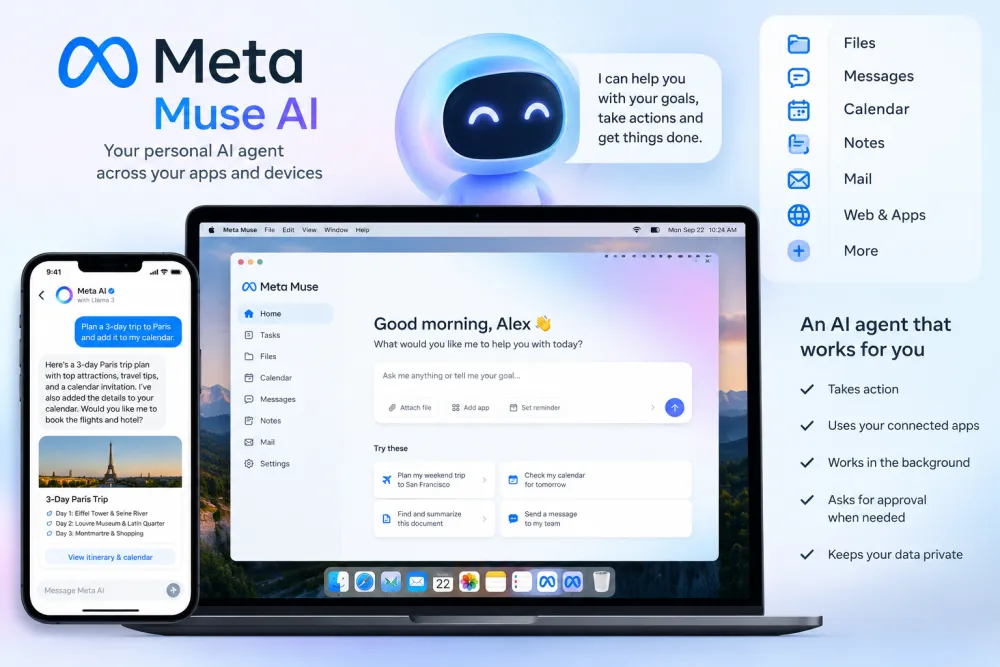
Meta Muse AI is a new personal AI agent from Meta designed to do more than simply answer questions. Instead of only generating text or giving suggestions, Muse can take actions on a user's behalf, such as helping with emails, travel planning, forms, shopping and other everyday tasks.
Meta introduced Muse on September 8, 2026, as part of its push toward personal AI agents. The service is designed to work across everyday apps and services, with users deciding which connections and permissions Muse can access.
The Muse experience is available through the web, mobile apps and WhatsApp, while a dedicated Mac app launched on September 18, 2026.
If you are searching for Meta Muse AI features, how to useMeta Muse AI, WhatsApp support, Mac availability or Meta Muse AI India availability, here is everything you need to know.
What Is Meta Muse AI?
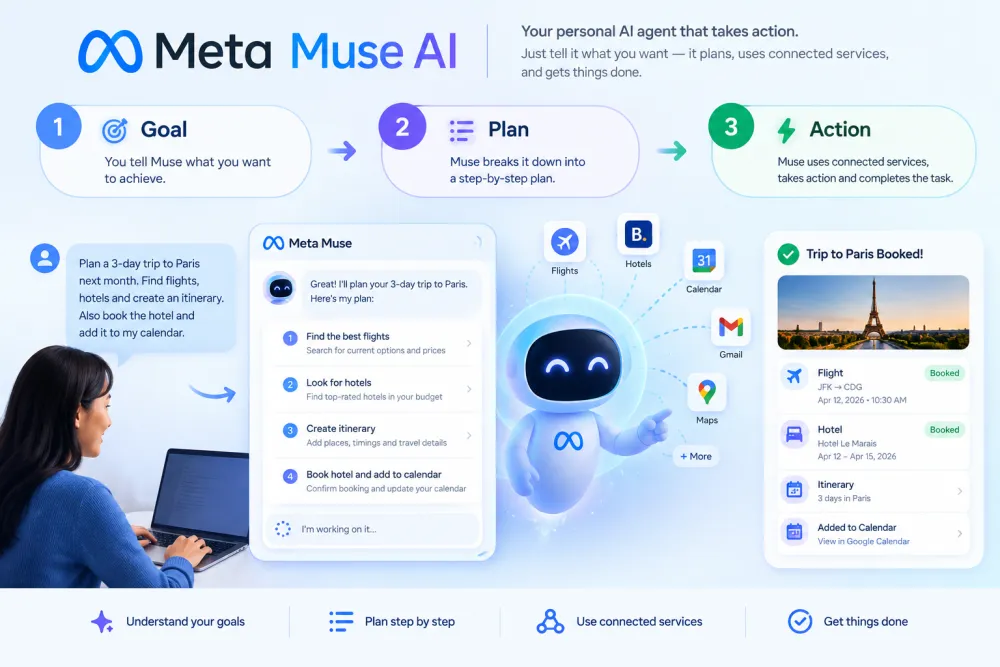
Meta Muse AI is a personalAI agentdeveloped by Meta. Unlike a traditional chatbotthat mainly responds to prompts, Muse is designed to complete tasks and work toward goals.
For example, users can ask Muse to help with tasks such as:
1. Sending emails
2. Planning trips
3. Filling out forms
4. Creating plans
5. Turning recipe ideas into shopping lists
6. Organizing everyday tasks
7. Helping with purchases
8. Working with connected apps and services
Meta says Muse is powered by Muse Spark, its AI model designed for agentic tasks.The key difference is that Muse is designed to take action, rather than simply provide an answer.
What Can Meta Muse AI Do?

Meta Muse AI is built around everyday tasks and personal productivity.
According to Meta, Muse can help users with activities such as sending emails, booking travel and turning goals into actionable plans.
It can also work with connected services when the user gives it permission. Some examples include:
1. Send Emails
Muse can help with email-related tasks when the required service is connected. Instead of writing every step manually, you can tell Muse what you want to accomplish and let the agent handle the task.
2. Plan Travel
Muse can help organize travel plans and perform travel-related tasks.This makes it different from a standard AI chatbot because the goal is not just to give you travel suggestions but to help move the task forward.
3. Fill Out Forms
Muse can assist with completing online forms and other repetitive tasks.
4. Create Plans
You can give Muse a larger goal and ask it to turn that goal into a plan. For example, instead of asking: "Give me ideas for a weekly meal plan. "you could ask Muse to create a plan and help with the related tasks.
5. Help With Shopping
Meta says Muse can assist with purchases and uses Link by Stripe for checkout in supported scenarios. Shopify's Shop Pay and Password integrations were also announced as coming.
Meta Muse AI Features
The main Meta Muse AI features are designed to help users complete everyday tasks, manage goals, and interact with connected apps and services. Unlike a traditional chatbot, Meta Muse can take action on a user's behalf and continue working on tasks in the background.
Key Meta Muse AI features include:
1. Personal AI Agent: Understands user goals and can complete tasks instead of only answering questions.
2. AI Task Automation:Handles multi-step tasks such as sending emails, filling out forms, booking travel, and managing everyday work.
3. Web Browsing: Uses its own browser to search the web, navigate websites, and complete online tasks.
4. WhatsApp Integration: Users can interact with Muse directly through WhatsApp.
5. iOS and Android Support: Muse is available through dedicated mobile apps.
6. Mac App: The latest Mac version can work with files, Messages, Calendar, and other desktop tasks.
7. Connected Apps and Services: Users can connect email, calendars, Instagram, and other supported services.
8. Goal-Based AI Planning: Muse can turn long-term goals into action plans and continue working toward them.
9. Background Task Execution: Muse can keep working after the user closes the app and return when it needs approval or when something changes.
10. Voice and Calling Capabilities: Meta has been expanding Muse's ability to handle voice-related tasks and calls.
11. Permission Controls: Users can decide which apps Muse can access and what actions it is allowed to perform.
12. Muse Secure VM: Muse operates through a dedicated virtual machine designed to isolate the agent, user data, and credentials.
13. Approval for Sensitive Actions: Muse can ask for permission before actions such as sending emails or making purchases.
14. Activity and Audit Controls: Users can review what Muse has done and what it plans to do.
One of the key benefits of Meta Muse AI is user control. Instead of giving the agent unrestricted access, users can choose which apps and services to connect and manage the permissions available to Muse.
Meta says users can change permissions or disconnect connected services whenever they want.
Is Meta Muse AI Available on WhatsApp?

Yes, Meta Muse AI is available through WhatsApp, allowing users to interact with the AI agent directly from a familiar messaging interface.
The Meta Muse AI on WhatsApp experience allows users to communicate with Muse and tell it what they want to accomplish without necessarily switching to a completely new AI platform. This makes WhatsApp an important way to access Meta Muse AI features.
With Meta Muse on WhatsApp, users can:
1. Chat with the Meta Muse AI agent using natural language
2. Give Muse tasks and instructions
3. Ask Muse to help plan or complete multi-step tasks
4. Continue conversations in a familiar WhatsApp-style interface
5. Use Muse alongside other supported Meta Muse experiencesThe main advantage is convenience.
Instead of learning a new interface, users can interact with Meta Muse AI through WhatsApp using a messaging-style experience.
Meta Muse AI WhatsApp Support
If you already use WhatsApp regularly, Meta Muse WhatsApp integration can make AI assistance feel more natural. Muse is designed to understand your instructions, work toward your requested goal, and ask for additional information or permission when required.
Note: Availability and specific Muse features may vary by account, region, platform, and rollout stage.
How to Use Meta Muse AI
Using Meta Muse is designed to be relatively simple.
Step 1: Open Muse
Use the Muse web experience or the supported mobile app.
Step 2: Sign In
Sign in with the account required by the service.
Step 3: Connect Services
Connect only the apps or services that you want Muse to access.Meta says users remain in control of which apps and services they connect.
Step 4: Give Muse a Task
Instead of asking only for information, describe the result you want.For example:
"Help me plan a three-day trip and organize the tasks I need to complete."
Step 5: Review Sensitive Actions
Muse is designed to ask for approval before certain sensitive actions are performed.This is particularly important when an AI agent is working with personal information or connected services.
Meta Muse AI Mac App

The Meta Muse AI Mac app launched on September 18, 2026, bringing Meta's personal AI agent directly to Mac computers. Unlike a traditional chatbot, Muse can work across supported apps and files on your Mac to help complete tasks on your behalf.
What Can Meta Muse AI Do on Mac?
The Meta Muse Mac app can work with files, Messages, Calendar, Notes, Mail, apps, and browser tabs, depending on the permissions you give it. This allows Muse to handle tasks across your computer instead of limiting AI assistance to a single chat window.
Key Meta Muse AI Mac features include:
1. File access: Muse can work with files on your Mac when you grant permission.
2. Messages and Mail: It can work with supported messaging and email apps.
3. Calendar integration: Muse can use calendar information to help with tasks and planning.
4. Notes support: It can access and work with Notes when permission is enabled.
5. Browser interaction: Muse can work with browser tabs and complete web-based tasks.
6. Permission controls: You decide which information and apps Muse can access.
7. Sensitive-action approval: Muse asks for permission before certain sensitive actions.
Why Is the Meta Muse Mac App Different?
The biggest difference is that Meta Muse AI for Mac is designed to operate across your computer rather than simply answering questions in a chatbot interface. Meta describes Muse as a personal AI agent that can take actions, complete multi-step tasks, and continue working toward goals with user direction and oversight.
For users who want an AI agent for Mac that can work with files, apps, web pages, and everyday computer tasks, the Muse Mac app extends the agent experience from mobile and web to the desktop.
Is Meta Muse AI Available in India?
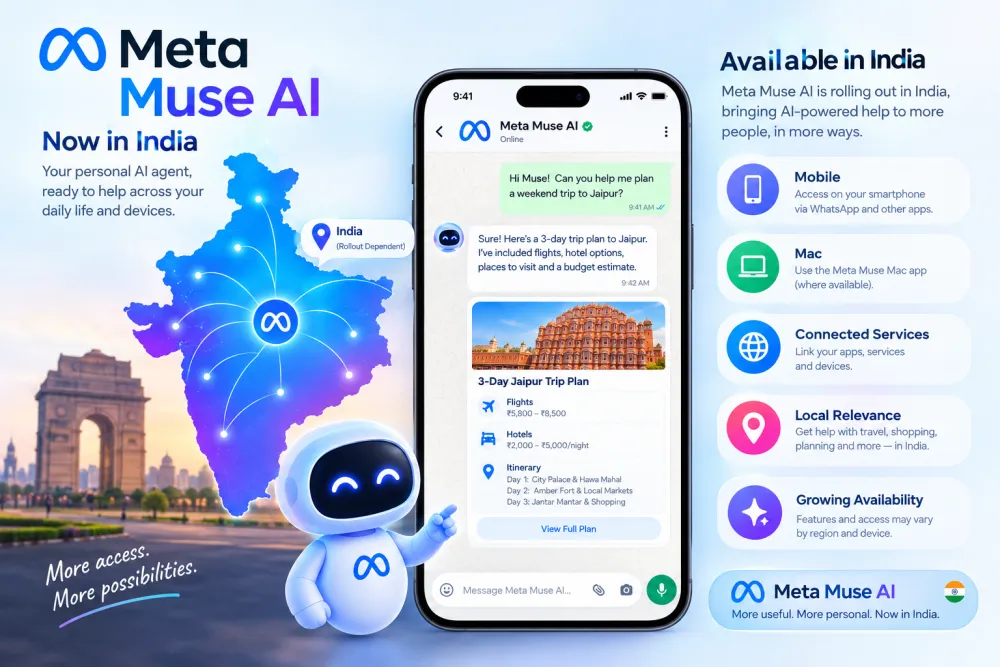
If you are searching for “Meta Muse AI India” or asking “Is Meta Muse AI available in India?”, the key point is that Meta Muse initially launched for consumers in the United States. Meta announced Muse on September 8, 2026, and initial reporting described the consumer rollout as U.S.-only.
At the time of writing, Meta's official Muse download page lists the Muse apps for iPhone, Android, and Mac, but it does not provide a specific confirmation that the consumer Muse service has launched in India.
Can You Use Meta Muse AI in India?
Meta Muse AI availability in India should be checked before signing up or downloading the app. The availability of an app on a particular platform does not necessarily mean that the Muse service is available in every country.
Meta may expand Muse AI to India and other markets as the service rolls out internationally. Therefore, Indian users should check Meta's official Muse page and app-store availability for their region for the latest information.
For users searching for Meta Muse AI India, the safest conclusion is:
Meta Muse initially launched in the U.S., and India availability should be confirmed from Meta's current regional availability before assuming the service can be used in India.
This is different from Meta AI, which is a separate consumer AI assistant available across Meta's apps and has had a broader international rollout.
Last checked: September 20, 2026.
Is Meta Muse AI Free?
Yes, Meta Muse AI is free to use, but the free plan comes with a usage limit. Meta says users can continue using Muse for free until they reach their usage limit. Once the limit is reached, users can either wait for their free usage to refresh or upgrade to a paid subscription for additional usage.
Meta Muse AI Pricing and Plans
Plan
Price
Usage
Free
$0
Limited Muse usage
Power
$20/month
More usage for everyday tasks
Maximum
$100/month
Higher usage limits
Meta also provides a usage meter so users can see how much of their available usage remains. When free usage runs out, Muse warns users and provides options to upgrade or wait for the limit to refresh.
Is Meta Muse AI Completely Free?
No. The basic version of Meta Muse AI is free, but it is not unlimited. Users who need to complete more tasks can choose a paid plan when available.
The important difference is that you do not need a paid subscription to try Muse. Meta's official FAQ currently describes Muse as free with a usage limit.
Meta Muse AI Pricing: What You Should Know
Pricing, subscription availability, usage limits, and regional access can change as Meta expands Muse. Therefore, users should check Meta's latest official information before subscribing.
In short: Meta Muse AI is free to start, but paid plans provide additional usage after the free limit is reached.
How Is Meta Muse Different From a Normal AI Chatbot?
The biggest difference between Meta Muse and a normal AI chatbot is the agentic approach. A traditional chatbot primarily focuses on understanding a user's prompt and generating a response, while an AI agent such as Muse is designed to work toward a goal and take actions on the user's behalf.
Traditional AI Chatbot vs Meta Muse AI Agent
A traditional AI chatbot generally works like this:
Question → AI understands → Answer
An AI agent such as Meta Muse AI is designed to work more like:
Goal → Plan → Take Actions → Complete Task
This means Muse is not limited to simply answering questions. According to Meta, Muse can perform multi-step tasks, interact with supported apps and websites, work in the background, and ask for user approval when an action requires permission.
Example: Planning a Trip
With a traditional AI chatbot, you might ask:
“How should I plan a trip to Paris?
”The chatbot can provide suggestions, create an itinerary, and explain what you should do.
With an AI agent like Meta Muse, the goal is more action-oriented. Depending on the available integrations and permissions, Muse can potentially help with tasks such as researching options, organizing information, interacting with websites, and managing related tasks.
Why Is Meta Muse Called an AI Agent?
Meta positions Muse as a personal AI agent because it is designed to move beyond simple question-and-answer interactions. It can understand a goal, break it into multiple steps, use connected tools or services, and work toward completing the requested task.
However, Muse does not have unrestricted control over a user's accounts or computer. Permissions and user approvals are an important part of the system, particularly for sensitive actions.
In simple terms:
Normal AI chatbot: Mainly answers your questions.
Meta Muse AI agent: Designed to understand your goal and help take the necessary actions to accomplish it.
Meta Muse AI Privacy and Security
Because Meta Muse AI can interact with personal apps, websites, files, and connected services, privacy and security are important parts of how the AI agent works.
Meta says Muse is built with security controls that are designed to keep users in control while the agent performs tasks on their behalf.
What Is Muse Secure VM?
One of the key security features is Muse Secure VM. Meta says Muse runs inside a persistent, dedicated virtual machine with its own browser. This provides a controlled environment where the AI agent can browse websites and perform tasks such as filling out forms, booking appointments, and handling customer-service requests.
Meta Muse AI Privacy Features
Meta says Meta Muse AI privacy controls include:
Permission controls: Users can decide which connected apps and services Muse can access.
Approval for sensitive actions: Muse can ask for permission before actions such as sending messages, making purchases, or sharing information.
Activity audit trail: Users can review actions Muse has completed and what it plans to do.
Secure credential storage: Meta says user logins are kept in a secure credential store that Muse itself cannot read.
Shopping protection: For purchases, Meta says a one-time card number can be generated at checkout so the user's real card details are not exposed to the merchant or Muse.
Privacy controls: Users can manage permissions for individual connections and change their approval settings.
Does Meta Muse AI Ask Before Taking Actions?
Yes. Meta says Muse is designed to request user permission before certain sensitive actions, including sending messages, making purchases, or sharing information with connected apps. Users can allow an action once, always allow it, or deny it.
Is Meta Muse AI Safe?
Meta describes Muse as being built with automated protections, agentic AI security standards, and user controls intended to help prevent harmful content and unauthorized actions. Users can also review the agent's activity, manage permissions, and report issues.
However, users should still review permissions carefully before connecting personal services such as email, calendars, social-media accounts, shopping services, or other sensitive accounts to any AI agent.
In short: Meta Muse uses a combination of Muse Secure VM, permission controls, approval requests, secure credential storage, and activity monitoring to give users more control over an AI agent that can take actions on their behalf.
Meta Muse AI Limitations
Although Meta Muse AI is designed to work as a personal AI agent, it still has some limitations that users should understand before relying on it for important tasks.
Main Meta Muse AI Limitations
Some of the key Meta Muse limitations include:
1. Regional availability: Muse availability can depend on the user's country or region.
2. Limited integrations: Not every app, service, or website may be supported or available in every region.
3. User approval requirements: Certain sensitive actions require confirmation before Muse can complete them.
4. Free usage limits: The free version of Muse has usage limits, and users may need to wait for the limit to refresh or use a paid plan for additional usage.
5. Permission requirements: Connected apps and services require appropriate permissions before Muse can access or interact with them.
6. AI mistakes: Like other AI systems, Muse can make mistakes or misunderstand instructions. Important information and actions should therefore be reviewed before relying on them.
7. Changing features: Muse is still an evolving AI agent, so available features, integrations, pricing, and usage limits can change over time.
Is Meta Muse AI Perfect?
No. Meta Muse AI is not completely autonomous or error-free. The agent is designed to work toward user goals, but it can still require clarification, permission, or human intervention.
For sensitive tasks involving email, payments, personal information, bookings, or other important decisions, users should review Muse's actions before allowing them to proceed.
The Meta Muse Mac app and other platform-specific features are also evolving as Meta continues to develop the service. This means that some capabilities available today may change, expand, or become subject to different requirements in the future.
In short: Meta Muse AI can automate many tasks, but users should consider its availability, integrations, permissions, usage limits, and potential AI errors before relying on it for important activities.
Meta Muse AI vs ChatGPT

Meta Muse AI and ChatGPT are both AI assistants with agentic capabilities, but they come from different product ecosystems and emphasize different workflows.
Meta Muse AI is positioned by Meta as a personal AI agent that can work toward goals, take actions, browse the web, interact with supported apps and services, and continue working on tasks in the background. Meta also supports interacting with Muse through its dedicated apps and WhatsApp.
ChatGPT, meanwhile, combines conversational AI with research, analysis, coding, writing, connected apps, and agentic workflows. ChatGPT Work can work across apps and files, use the web, and turn complex goals into finished documents, spreadsheets, presentations, and other deliverables.
Meta Muse vs ChatGPT
Feature
Meta Muse AI
ChatGPT
AI conversation
Yes
Yes
AI agent capabilities
Yes
Yes
Task automation
Yes
Yes, with supported agent/Work featuress
Goal-based task execution
Yes
Yes
Web browsing and actions
Yes
Yes
Connected apps and services
Yes
Yes, depending on available apps and permissions
Background task execution
Yes
Yes, with supported Work/Scheduled features
WhatsApp experience
Yes
Not a core ChatGPT interface
Mac experience
Yes
Yes
Files and documents
Yes
Yes
Research and analysis
Yes
Yes
Coding
Not the primary focus
Yes
Content creation
Yes
Yes
Shopping/task actions
Designed to perform actions such as purchases
Supported through available tools and agent capabilities
Personal AI agent positioning
Core product focus
Available through agentic ChatGPT features
Availability
Depends on Meta's rollout and region
Depends on ChatGPT plan, feature and region
Meta describes Muse as a personal AI agent that can answer questions, complete tasks, browse the web, make purchases, create documents, connect to apps, set reminders, track goals, and work in the background.
ChatGPT's agentic capabilities similarly allow it to perform complex online tasks, use connected apps, interact with websites, and work across files and other tools. OpenAI's current ChatGPT Work product is designed for longer, multi-step projects and can produce finished work from a user's goal.
The Practical Difference
The difference is therefore less about “chatbot vs AI agent” and more about how each company integrates agentic AI into its ecosystem.
Meta Muse:
Goal → Plan → Use connected services → Take actions → Continue working
ChatGPT:
Prompt/Goal → Reason → Research/Use tools → Take actions → Create or complete the result
Both can move beyond simple question-and-answer conversations. The exact capabilities depend on the user's plan, permissions, connected services, device, and regional availability.
In short: Meta Muse is built around Meta's vision of a personal AI agent that works across everyday services and devices, while ChatGPT combines conversational AI, research, creation, coding, connected tools, and agentic workflows in the ChatGPT ecosystem.
Who Should Use Meta Muse AI?
Meta Muse may be useful for people who regularly handle repetitive digital tasks.
Potential users include:
1. Students
2. Professionals
3. Freelancers
4. Business owners
5. Content creators
6.Travelers
7. People who manage multiple online services
The biggest benefit is the ability to describe a goal or task rather than manually performing every individual step.
Frequently Asked Questions
What is Meta Muse AI?
Meta Muse AI is a personal AI agent from Meta designed to help users complete tasks and manage goals rather than only answer questions.
Is Meta Muse AI free?
Does Meta Muse AI work on WhatsApp?
Yes. Meta announced Muse support through WhatsApp as part of its launch.
Is meta muse free
Yes, Meta Muse is free to use. However, access may currently be limited by country or rollout availability.
Is Meta Muse AI available in India?
The initial rollout was focused on the United States. Availability in India should be checked against Meta's latest rollout information.
Does Meta Muse have a Mac app?
Yes. Meta launched the Muse Mac app on September 18, 2026.
What can Meta Muse AI do?
Muse can help with tasks such as email, travel planning, forms, shopping, planning and other activities through connected services.
Is Meta Muse better than ChatGPT?
They are designed with different areas of emphasis. Muse focuses strongly on personal agentic tasks, while ChatGPT supports a broader range of conversational, research, writing, coding and other AI workflows.
Is meta muse in india
No. Meta Muse is currently not available in India. It was initially launched with limited availability, and India has not yet received full access.
Meta Muse AI represents Meta's move toward personal AI agents that can do more than answer questions. Instead of simply providing information, Muse is designed to understand user goals, plan tasks, interact with connected services, and take actions on the user's behalf.
Its combination of AI task automation, WhatsApp access, connected apps and services, background task execution, and the Meta Muse Mac app makes it an important development in the AI agent space in 2026.
However, Meta Muse AI availability, features, pricing, and supported integrations can vary by market and platform. Users should check Meta's latest official information before downloading Muse, connecting personal services, or subscribing to a paid plan.
For users searching for Meta Muse AI India, Meta Muse AI WhatsApp, Meta Muse AI Mac, Meta Muse AI features, Meta Muse AI pricing, or how to use Meta Muse AI, the most important things to check are regional availability, supported platforms, permissions, usage limits, and available integrations.
Overall, Meta Muse AI is designed to make AI more action-oriented, moving beyond traditional chatbot conversations toward an AI agent that can help users accomplish tasks across the services and devices they use.